12.11.2013 Fixed a typo in OrderBy part of the CAML.
29.06.2012 Fixed a missing “&” in line 48 – thanks to Jim.
I got a request some time ago from Brett Anderson, asking for a solution for sending a group email to users stored in a SharePoint list.
This solution can be used to harvest email addresses from a SharePoint list, and sending an email using the users local email client. It requires the email addresses to be stored in plain text.
When setup it will look like this:

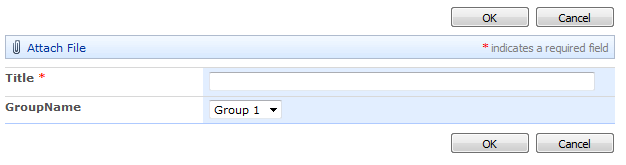
Create a list (or reuse an existing) with two fields: One for storing the email (in this example the Title field), and one for storing the distribution group name:
Add this code to a CEWP using the content link option linking to a file containing the code, or in a HTML Form web part in the sourcecode editor, somewhere in your portal:
<table cellpadding="2">
	<tr>
		<td valign="top" title="Ctrl + click to select multiple groups" style="cursor:help;">Select groups</td>
		<td valign="top" title="Use BCC to hide the addresses from the receiver" style="cursor:help;">Address option</td>
		<td valign="top"></td>
	</tr>
	<tr>
		<td valign="top" id="groupSelectTd">
			<select id="distributionGroupSelector" multiple="multiple" size="3"></select>
		</td>
		<td valign="top">
			<input type="radio" name="cc_bcc" id="radio_to" value="to"><label for="radio_to">To</label><br>
			<input type="radio" name="cc_bcc" id="radio_cc" value="cc"><label for="radio_cc">CC</label><br>
			<input type="radio" name="cc_bcc" id="radio_bcc" value="Bcc" checked="checked"><label for="radio_bcc">BCC</label>
		</td>
		<td valign="top">
			<input type="button" onclick="doSendGroupEmail()" value="Open email client">
		</td>
	</tr>
</table>


<script type="text/javascript" src="/Scripts/jquery-1.11.0.min.js"></script>
<script type="text/javascript" src="/Scripts/spjs-utility/spjs-utility.js"></script>
<script type="text/javascript">

var emailgroupArgObj = {"listGuid":"SendMail",
						"listBaseUrl":L_Menu_BaseUrl,
						"groupNameField":"GroupName",
						"emailField":'Title',
						"subject":"My email subject",
						"body":"My email body"};

/*************************************************/
/*********** No changes below this line **********/
/*************************************************/
var emailObj = {};

function getEmailGroups(argObj){
	var res, qb, hb;
	qb = [];
	qb.push("<Where>");
	qb.push("<IsNotNull>");
	qb.push("<FieldRef Name='"+argObj.emailField+"' />");
	qb.push("</IsNotNull>");
	qb.push("</Where>");
	qb.push("<OrderBy><FieldRef Name='"+argObj.groupNameField+"' /></OrderBy>");
	res = spjs_QueryItems({listName:argObj.listGuid,listBaseUrl:argObj.listBaseUrl,query:qb.join(''),viewFields:['ID',argObj.emailField,argObj.groupNameField]});
	hb = [];
	$.each(res.items,function(i,item){
		if(emailObj[item[argObj.groupNameField]]===undefined){
			emailObj[item[argObj.groupNameField]] = [];
			hb.push("<option value='"+item[argObj.groupNameField]+"'>"+item[argObj.groupNameField]+"</option>");
		}
		emailObj[item[argObj.groupNameField]].push(item[argObj.emailField]);
	});
	$("#distributionGroupSelector").html(hb.join(''));
}

function doSendGroupEmail(){
	var groupIdArr = $("#distributionGroupSelector").val(), emailArr = [], link = "";
	if(groupIdArr === null){
		$("#groupSelectTd").css("background-color","#ffcccc");
		return;
	}else{
		$("#groupSelectTd").css("background-color","#ffffff");
	}
	$.each(groupIdArr,function(i,groupId){
		emailArr = $.merge(emailArr,emailObj[groupId]);
	});
	if($("#radio_to").prop('checked')){
		link += "mailto:"+emailArr.join('; ')+"&";
	}else if($("#radio_cc").prop('checked')){
		link += "mailto:?cc="+emailArr.join('; ')+"&";
	}else{
		link += "mailto:?bcc="+emailArr.join('; ')+"&";
	}
	location.href = link+"subject="+emailgroupArgObj.subject+"&body="+emailgroupArgObj.body;
}

getEmailGroups(emailgroupArgObj);
</script>
Change the properties in the variable “emailgroupArgObj” to match your setup
- listGuid: The list GUID or the display name of the list containing the email addresses.
- listBaseUrl: The base url of the list containing the email addresses. If the code is in the same site, no need to change the variable L_Menu_BaseUrl.
- groupNameField: The FieldInternalName of the field containing the group name.
- emailField: The FieldInternalName of the field containing the email address.
- subject: Enter a value here to have the subject field prefilled in the email client.
- body: Enter a value here to have the body field prefilled in the email client.
Read here on how to find the list GUID and the FieldInternalNames
You find jQuery here, and spjs-utility.js here – ensure you use the latest version.
Ask if anything is unclear.
Alexander
Hi Alexander,
Great work on this, I’ll be trying this solution out today.
Very much appreciate your time and effort with your fantastic blog, I don’t know how you find the time. I’ll be sending a beer/flowers donation your way for answering my request.
Thank You,
Brett
Hey Alexander, I tested this out and it works great. I’ll be using this with a Subscribe button on my site. Brett.
Hello Alexander,
Is it possible to make the single choice dropdown a multiple choice dropdown field?
Kind regards,
Mario
Hi Alexander. Annother great solution cheers! Just one bug I spotted. I think Line 48 is missing +”&”; at the end as without this, it concatentates the subject with the emails when you use the ”To” option.
Cheers
Jim
Fixed – thank you.
Alexander
I have done some work on group e-mailing myself. One issue you’ll run into is that browsers have a URL length limit (~2000 characters for some). It means that when you reach 100 to 150 recipients you’ll have to switch to a different technique.
Hi Alex,
Great piece of code – very useful. Thanks!
Is there any way that you can apply this same code on a DispForm and have it pull names from a field? I have a form where three names are picked (in seperate fields) – can there be a button that once clicked opens the email client and populates the To: field with the three names that were picked on the form?
Hi Alex
I’m trying to use your very helpful piece of code but I keep getting errors:
SCRIPT5009: ‘$’ is undefined
spjs-utility.js, line 196 character 1
SCRIPT5009: ‘$’ is undefined
spjs-utility.js, line 211 character 2
SCRIPT5009: ‘$’ is undefined
DLs.aspx, line 650 character 2
SCRIPT5009: ‘$’ is undefined
DLs.aspx, line 650 character 2
SCRIPT5009: ‘$’ is undefined
DLs.aspx, line 650 character 2
SCRIPT5009: ‘$’ is undefined
DLs.aspx, line 650 character 2
Do you know what may be causing this? Its SP2013
Many Thanks
GK
What I need to change inorder to use a checkbox instead.
Hi Alex. Just saw this. Great stuff, as always. Haven’t tried it yet but I am just curious: would there be a sorting order for the group i.e. alphabetical sorting?
Yes, the groups are ordered alphabetical.
Alexander
Hi Alex. Thanks for the reply. I tested the code out yesterday using a test list wherein the group name is Office, where in content is the name of a country. I have six countries but it doesn’t list the countries alphabetically. Here’s how the grouping was ordered on my list:
Angola
Brazil
Belgium
Uganda
Afghanistan
New Zealand
Finland
What do you think I am doing wrong? Should the list be sorted by Office value? Thanks.
I had a typo in the orderby part of the caml Fieldref > FieldRef
Can you test it now?
Alexander
Hi Alex. Thanks for reply and sorry if I replied a day late. No access to our test lab yesterday afternoon. Tested it just now and it’s working. Your stuff is really helping me to learn how to properly code. Hope I can put my learnings to good use someday, like what you’re doing now. 🙂
What a great script Alexander, it works like a charm!
But I have a request: could it be possible to select more groups to add their mail addresses to an email?
Hi,
This method does not let you add recipients to the email after is has been “created”.
Alexander
Great script as it allows emails to be sent to pagers and SMS text. Many organizations restrict emails to SharePoint Security Groups to internal email addresses registered with SharePoint.
However, my user audience is comprised of 150 individuals across 18 different groups. We need to email any number of those teams at one time rather than running the script over and over for different teams. Can you provide a script mod that allows any number of groups, or all of them, to be submitted at one time?
Thanks for your help.
Hi,
The article is updated with new code. Let me know how this works for you. Please note that there may be limitations in the browser preventing you to add a large number of addresses.
Alexander
Thank you so much for adding support for choosing multiple groups Alexander. I have tested the new script, it works great!
I’m getting an error message from spjs_queryItems
missing parameters
Listname
query or viewname
and viewfields.
I used the links provided to get the items for the spjs utility. I was wondering if you had or have an idea on how o solve this as I can not get the code to wok at all
Hi,
Try changing the variable “L_Menu_BaseUrl” to the base URL of the site where you have the “SendMail” list.
This will be an empty string like this “” if you are on the root of your site collection, or for example “/Sites/MySite” if you are on a managed path.
Alexander
I found this and I’m able to use it in SP2013. I have my groups and addresses. Works great in Firefox. If I try IE or Chrome, small lists work but large lists just seem to hang the browser.
Is there a way to get them to work with IE or SharePoint?
There might be a limit on the number of email addresses in a “mailto” link in IE. How many addresses are you trying to send to?
Also you can try bringing up the developer console to look for errors there (hit F12 > Console).
Alexander
Hi Alex,
Love this bit of code. However , I’m wondering if there’s any way possible to put HTML in the body
Sorry, but having a HTML body is not possible using this method.
Alexander