› Forums › General discussion › Display form columns css
- This topic has 10 replies, 2 voices, and was last updated 5 years, 7 months ago by
Alexander Bautz.
-
AuthorPosts
-
-
December 9, 2018 at 23:49 #23015
Joel Hjalmarsson
ParticipantHi
I have an issue with my display form and how it renders. The New form and edit form renders perfectly but the dsiplay form looks awful. The left column pushes out the other columns as i have a question that is rather long and it doesn’t seem to wrap. I have yet to figure out how to change this. I want it to look as neat as the other forms.Attachments:
-
December 10, 2018 at 16:50 #23040
Alexander Bautz
KeymasterAdd this to the Custom CSS tab:
td.ms-formlabel{
    width:200px; // Set to the preferred width
    white-space:normal;
}
Alexander
-
December 10, 2018 at 20:18 #23052Participant
Thank you for that but its not changing anything. I have no errors when i paste it in and have reloaded cleaned cache and all and still looks bad.
-
December 10, 2018 at 20:28 #23054Keymaster
Are you 100% sure you have added the code to the correct form?
If so, you can try adding the !important flag like this:td.ms-formlabel{ width:200px!important; // Set to the preferred width white-space:normal!important; }You can use the developer tools to see what style is applied – right click the item you want to look at and select Inspect – now you can see the style in the dev tools.
Alexander
-
December 10, 2018 at 20:30 #23056Participant
Yep.. its in the display form tab I’ll add that and see what happens.
-
December 10, 2018 at 20:33 #23058Participant
I think the formlabel needs a word wrap also?? As there is one question that pushes it all out?
-
December 10, 2018 at 20:44 #23062Participant
Looks like this
Attachments:
-
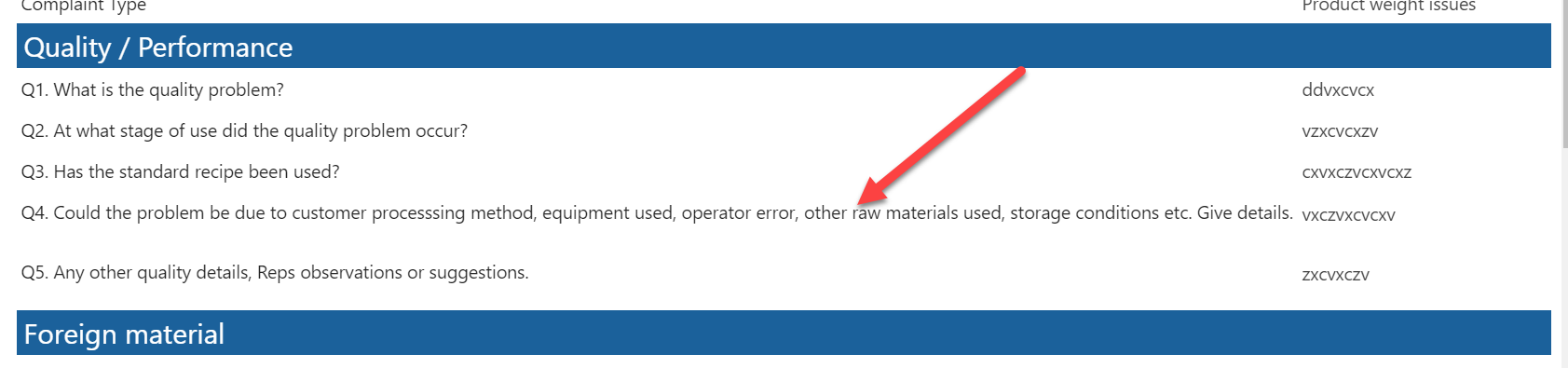
December 10, 2018 at 20:45 #23065Participant
And this is the culprit
Attachments:
-
December 10, 2018 at 20:59 #23068Participant
got it working.. yay.. had to use
.ms-formlabel{
width:35px;
white-space:normal;
word-wrap:normal;
} -
December 10, 2018 at 20:59 #23070Participant
thank you very much.
-
December 11, 2018 at 14:48 #23077Keymaster
I’m glad you figured it out.
Alexander
-
-
AuthorPosts


- You must be logged in to reply to this topic.