› Forums › Classic DFFS › CSS style of selected tab
- This topic has 7 replies, 3 voices, and was last updated 6 years, 1 month ago by
Craig Campbell.
-
AuthorPosts
-
-
February 14, 2018 at 10:05 #19828
Phil Grant
ParticipantHi,
I would like to change the colour of the selected tab (different to the default), I assume I can use the custom CSS box but Can someone give me guidance of how to do it, I’ve used “inspect element” but I can’t figure it out.Thanks,
Phil -
February 14, 2018 at 18:21 #19834Participant
OK found it in another post 🙂
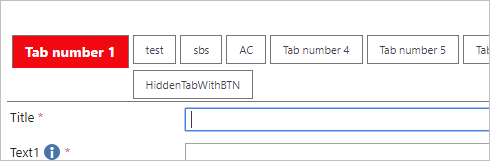
but if I use this in the Custom CSS it doesn’t change the colour of the font to white?
ul.tabRowLast li.tabSelected a{ background-color: red!important; color: white!important; font-size:14px; font-weight: bold; }-
This reply was modified 6 years, 2 months ago by
Phil Grant.
-
This reply was modified 6 years, 2 months ago by
-
February 14, 2018 at 21:37 #19840
Alexander Bautz
KeymasterI tried this in my Custom CSS and it sets the background color to red and the forms color to white. Could it be that you have other CSS that overrides it?
Alexander
-
February 14, 2018 at 22:15 #19846Participant
I want to set the font in the selected tab to white against the red background, doesn’t the “Color: white” do that?
-
February 15, 2018 at 00:08 #19850Keymaster
Yes, and when I tested it it looks like the attached image. If it doesn’t work in your setup you might have another CSS snippet that overrides it?
Alexander
Attachments:
-
March 16, 2018 at 18:01 #20266
Craig Campbell
ParticipantHi alex, is there a way to change the size and color of the other tabs that are not selected?
-
March 18, 2018 at 15:50 #20293Keymaster
Here is an example to use in Custom CSS:
/* Style base tab */
li.tabBase a{
    background-color:gray!important;
    padding:0 2px!important;
}
li.tabBase span{
    color:black!important;
}
/* Style selected tab */
li.tabSelected a{
    background-color:green!important;
    padding:2px!important;
}
li.tabSelected a span{
    color:yellow!important;
}
Alexander
-
March 22, 2018 at 16:28 #20355Participant
Thank you Alexander that works great!
-
-
AuthorPosts
- You must be logged in to reply to this topic.