
DFFS forms show a blank white page: it needs a Microsoft support ticket
Home › Forums › Modern DFFS › DFFS forms show a blank white page: it needs a Microsoft support ticket
Tagged: Modern DFFS - Blank screen
- This topic has 4 replies, 1 voice, and was last updated 4 weeks ago by
Alexander Bautz.
-
AuthorPosts
-
-
October 13, 2026 at 09:51 #39790
DFFS forms show a blank white page: this is a SharePoint server error, and it needs a Microsoft support ticket
Some customers see every DFFS form (New, Display and Edit) open as a completely blank white page. Typically:
– It affects every list where DFFS is activated, on every site in the tenant, including brand-new sites and lists.
– The list’s standard SharePoint form works fine until DFFS is activated on the list.
– The DFFS button in the list view command bar still works, and you can open the DFFS configuration.
– The browser console shows nothing from DFFS.
– Updating or reinstalling the DFFS app package doesn’t help.What is happening
We have investigated this with a customer. SharePoint’s server fails while it builds the form page (
SPListForm.aspx) for a list that uses a custom form. The page is cut off partway through and an error page is inserted in its place, so the browser never receives the part that tells it to load DFFS. DFFS code never runs, which is why the page is blank and there is nothing in the console.This happens inside SharePoint Online before DFFS is involved, so we can’t fix it from our side. Microsoft needs to investigate it in your tenant.
How to confirm you have this issue
1. Open one of the blank forms.
2. Press **Ctrl+U** to view the page source.
3. Press **Ctrl+F** and search forGearPage.If you find a short script near the end of the source that mentions
GearPageand setsdocument.title = "Error", and the rest of the page is nearly empty, you have this issue.How to open a ticket with Microsoft
Microsoft will need the request ID of a failing page load, so their engineers can find the server error in their logs:
1. Open a blank form and press **F12** to open the developer tools.
2. Go to the **Network** tab and reload the page.
3. Click the first request in the list,SPListForm.aspx.
4. Under **Headers → Response Headers**, copy the value of **SPRequestGuid**. Also note the date and time of the reload.Then open a support request in the **Microsoft 365 admin center** (Support → Help & support → New service request). Use a description along these lines:
- SharePoint Online list forms that use an SPFx Form Customizer render a blank page.
SPListForm.aspxreturns HTTP 200, but the response is truncated after the<head>, and SharePoint’s error page (“GearPage”, title “Error”) is inserted in the body. As a result, the form customizer is never loaded. - This happens on all sites in the tenant, including newly created sites and lists, whenever a content type has
NewFormClientSideComponentId/EditFormClientSideComponentId/DisplayFormClientSideComponentIdset. - The solution is deployed tenant-wide from the tenant app catalog. Other extensions from the same solution package load normally, and redeploying the package does not change anything.
- SPRequestGuid: [paste here]
- Date/time (UTC): [paste here]
You can also attach a HAR file of the page load. To capture one, go to the Network tab with **Preserve log** ticked, reload the form, then click the download arrow and choose **Export HAR (sanitized)**.
Please check your release preference
The problem may be limited to tenants that receive SharePoint updates early. In the Microsoft 365 admin center, go to Settings → Org settings → Organization profile → Release preferences and see whether the tenant is on Standard release or Targeted release (for everyone or for selected users).
Please post your setting in this thread, whether it is Standard or Targeted. If we can show a pattern, it will help all the open tickets.
If you are on Targeted release, mention that in your Microsoft ticket.
You can try switching to Standard release, but be aware that this affects all Microsoft 365 apps in your organization, and the change can take 24 hours or more to apply. It is not certain to help, so open the ticket anyway rather than waiting to see.Workaround while you wait for Microsoft
To bring back the standard SharePoint forms on a list in the meantime:
1. Open the list and click the **DFFS** button in the command bar to open the DFFS configuration.
2. Go to the **Activate** tab, then **Install DFFS**.
3. Turn off the **New item form**, **View item form** and **Edit item form** toggles for the content types.Your DFFS configurations are not deleted. When Microsoft has resolved the issue, turn the toggles back on, and the forms will work as before.
If you have opened a ticket, please post Microsoft’s reply here when you receive it. It helps other customers with the same problem.
Regards,
Alexander - SharePoint Online list forms that use an SPFx Form Customizer render a blank page.
-
October 13, 2026 at 09:55 #39792
There is already a bug report posted here with the same symptoms (not related to DFFS): https://github.com/SharePoint/sp-dev-docs/issues/11056
Alexander
-
October 13, 2026 at 15:29 #39800
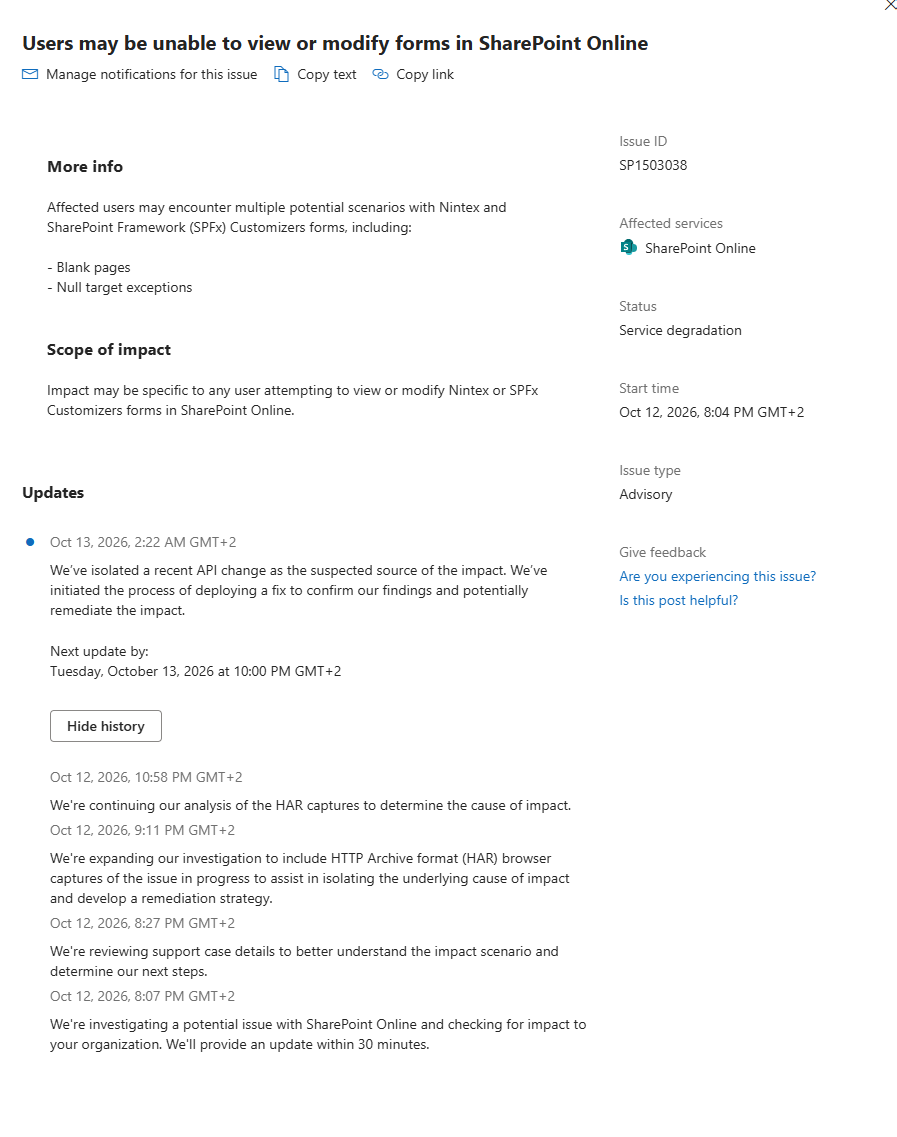
Microsoft has acknowledged the problem – see this link for details (you must sign in with your Microsoft account): https://admin.cloud.microsoft/?source=applauncher#/servicehealth/:/alerts/SP1503038
Alexander
-
October 13, 2026 at 17:08 #39801
Looks like Microsoft has removed the service health issue from the Microsoft 365 admin center. I grabbed a screenshot of it before it now just shows an access denied or “something went wrong” message.
I have attached a screenshot of the issue before they removed it.
Alexander
Attachments:
-
October 13, 2026 at 22:20 #39803
I’m getting reports that some of the affected tenants are up and running again so it is hopefully being rolled back on all affected tenants.
Regards,
Alexander
-
-
AuthorPosts

- You must be logged in to reply to this topic.