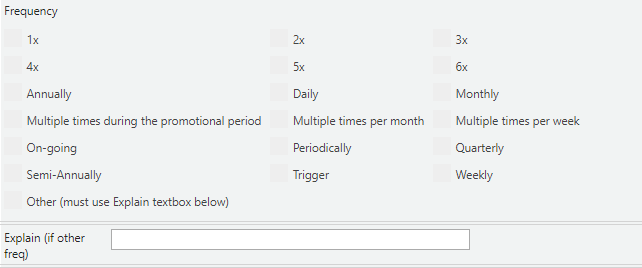
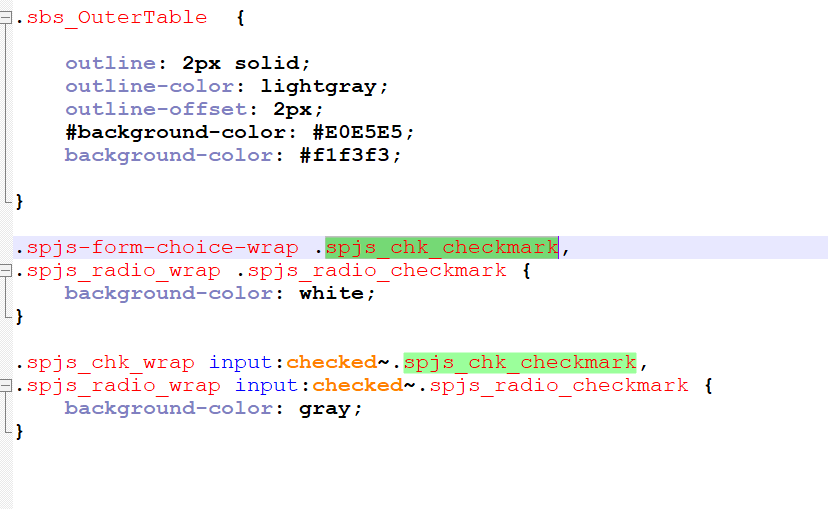
Changing color of checkbox itself Home › Forums › Requests › Changing color of checkbox itself This topic has 6 replies, 2 voices, and was last updated 1 year, 12 months ago by Rad. Viewing 6 reply threads Author Posts November 8, 2024 at 21:34 #38255 RadParticipant Hi Alex, I’ve a a multiselect checkbox field and would like to change the background color of the checkbox itself to white instead of default gray. Anyway to achieve this? thanks Attachments:2024-11-08_12-24-16.png November 9, 2024 at 09:26 #38258 Alexander BautzKeymaster You can add this to your Custom CSS: .spjs-form-choice-wrap .spjs_chk_checkmark, .spjs_radio_wrap .spjs_radio_checkmark { background-color: white; } .spjs_chk_wrap input:checked~.spjs_chk_checkmark, .spjs_radio_wrap input:checked~.spjs_radio_checkmark { background-color: gray; } Alexander November 12, 2024 at 16:28 #38263 RadParticipant I copied the code as is to my CSS file and checkboxes look same. The default checkbox color should be same color as the Explain textbox when editing. Attachments:2024-11-12_07-26-01.png November 12, 2024 at 17:51 #38266 Alexander BautzKeymaster I’m wondering if you have pasted the code in the correct place – can you show me a screenshot of your Custom CSS? Alexander November 12, 2024 at 18:05 #38267 RadParticipant I placed it withing my CSS file which is called from within custom CSS tab. Attachments:2024-11-12_09-04-01.png November 12, 2024 at 18:27 #38270 Alexander BautzKeymaster To ease the troubleshooting, can you add the CSS to the Custom CSS area directly? Alternatively, try adding !important to the style properties like this: .spjs-form-choice-wrap .spjs_chk_checkmark, .spjs_radio_wrap .spjs_radio_checkmark { background-color: white!important; } .spjs_chk_wrap input:checked~.spjs_chk_checkmark, .spjs_radio_wrap input:checked~.spjs_radio_checkmark { background-color: gray!important; } Alexander November 12, 2024 at 18:37 #38271 RadParticipant !important did the trick. thank you! Author Posts Viewing 6 reply threads You must be logged in to reply to this topic. Log In Username: Password: Keep me signed in Log In
.