13.08.2012 You find an updated version here.
04.06.2012 After a few bugfixes, the current release is now v1.2.3.
02.06.2012 V1.2.1 fixes another set of bugs – here are the detail from the change log:
- Fixed a bug that occurred when an identical rule was applied for multiple options in a single choice field (select or radio). This made the rules cancel eachother out.
- Small update to the function “hideFields” to prevent hiding an empty required field (where the required flag was set in the list settings).
- Another small update to the function “doReadOnly” to prevent the width of the “formlabel” to vary when toggling readonly for a field.
31.05.2012 V1.1 fixes a possible bug occurring when the Title-field is not present in the form.
This solution will let you add dependent logic to your forms:
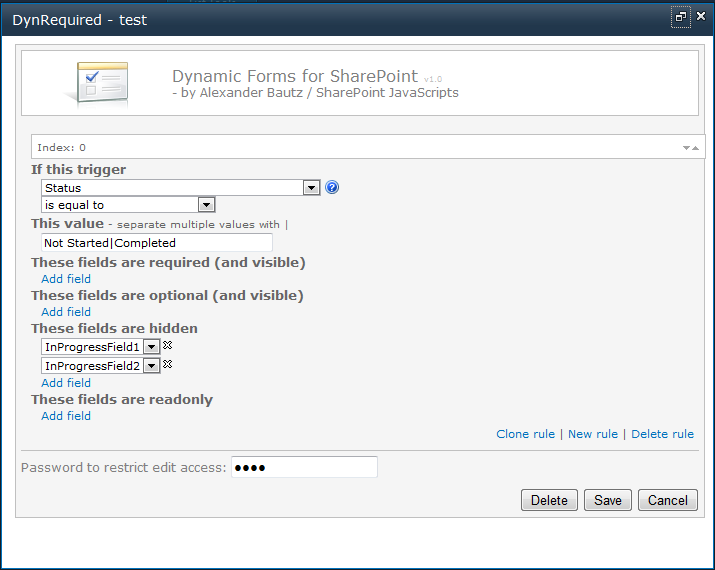
For example you could have a Yes/No check box determines whether some fields as required or not, or the status selector in a Tasks list can toggle which fields are visible or read only when you change from “In progress” to “Completed”.
All screenshots are from SharePoint 2010, but this solution is designed for both SharePoint 2007 and SharePoint 2010. I have tested it in IE7, IE9, FireFox 12.0 and Google Chrome 19.0.1084.52, but not extensively, so please let me know if you experience problems.
I have previously posted a BETA version of this solution, but I have finally updated the Dynamic Forms for SharePoint solution to a “production release”.
- You can use the solution in DispForm
- You can clone a rule, or clone the setup from NewForm to EditForm / DispForm
- You can use a date column as trigger – though only [today] will work in this version.
- Rich text column validation now works.
- You can use multiple trigger values (options within same column) for one rule
- You can check for group membership and execute rules if a user is NOT member in the group.
- No more problems using “is not equal to”.
This article will walk trough the features and the setup of the updated version. I have added this as a separate article to keep it tidy.
Download the file “DynamicFormsForSharePoint.js” and “spjs-utility.js” from here. Please note that you will need the version dated 18.01.2012 or newer of “spjs-utility.js”. You find the files in folders with corresponding names.
You also need jQuery – download it here. You may use the latest version, but i prefer v1.6.4 as it is faster in some areas. You can not use jQuery versions below 1.6. Please note that not all of my other solutions will work with jQuery v1.7x.
Put these files in a document library or a folder created with SharePoint Designer. Ensure all users have read access to this location.
This solution is set up by referring a script from NewForm, EditForm and DispForm of the lists where you want the solution activated.
Add a CEWP to NewForm, EditForm and DispForm like this:
SharePoint 2007
Go to NewForm and EditForm and edit the URL by adding toolpaneview=2 behind the URL in this format:
…/NewForm.aspx?toolpaneview=2
…/EditForm.aspx?ID=12&toolpaneview=2
…/DispForm.aspx?ID=12&toolpaneview=2Press Enter and you should be able to add a CEWP to the page. Put the CEWP below the form web part.
SharePoint 2010
In the list view, click “List” on the List Tools menu. Then select “Form Web Parts” and pick the form to add a CEWP to the page. Put the CEWP below the form web part.
I recommend using the Content link option in the CEWP to refer the code like the example below. The CEWP code should be put in a text file (txt) or an aspx file like in the example below. This file should be put in the same location as the file “DynamicFormsForSharePoint.js”.
CEWP setup in SharePoint 2010:
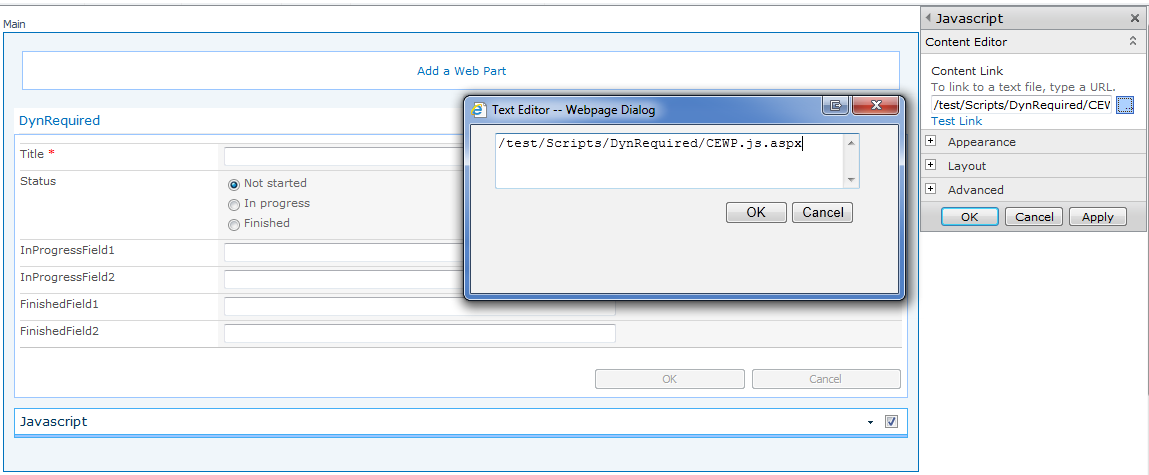
You could also put the code directly in a HTML Form web part as this web part is handled in a slightly different manner in SharePoint 2010, and therefore does not mess with the script generated HTML.
<script type="text/javascript" src="https://ajax.googleapis.com/ajax/libs/jquery/1.6.4/jquery.min.js"></script>
<script type="text/javascript" src="/test/Scripts/DynRequired/spjs-utility.js"></script>
<script type="text/javascript" src="/test/Scripts/DynRequired/DynamicFormsForSharePoint.js"></script>
You must change the script src to all files so that they refer your local files.
These three scripts are all that goes in the CEWP – all configuration is done in a graphical user interface.
When this solution is first setup in a site, the configuration list is created automatically. This list is not to be hand edited, and it can be hidden using SharePoint Designer if you like.
When you configure the solution for a specific NewForm, EditForm or DispForm, the configuration is stored using the site-relative URL of the form as an identifier. When a user loads the form in a browser, this configuration is read from this location and the rules are applied “on the fly”.
If you set a field as required in the list settings, and then hides it due to a rule when it’s still empty, the user will not be able to save the form.
When the solution is set up correctly, the only thing giving it away is the text “Dynamic Forms for SharePoint” in the bottom left corner of the form:
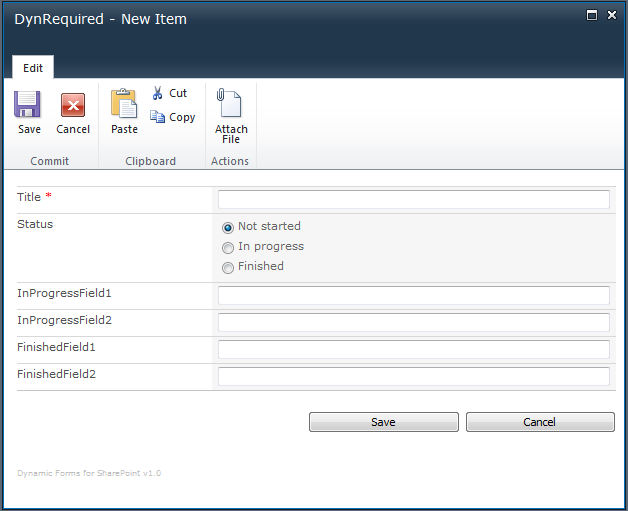
You click this text to enter the configuration. Note that this text number is visible only if the solution has not yet been configured for that form, or the logged in user is the one that configured the solution for this particular form in the first place.
You can however enter the edit mode manually by appending to the URL like this:
NewForm.aspx?dfsetup=1
EditForm.aspx?ID=10&dfsetup=1
DispForm.aspx?ID=10&dfsetup=1
If you set up a password protection for the configuration, you are prompted for the password when entering the edit mode:

This dialog is bypassed if a password has not been set.
You then enter the configuration:
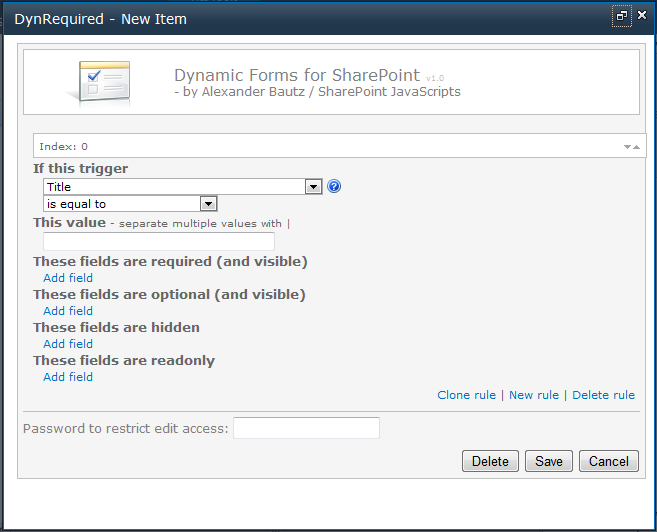
Note that in DispForm, the only configurable setting is “These fields are hidden”. Hover the mouse over this image  in the GUI to get some hints on how to set up the rules for each field type.
You can use these field types as “triggers”:
Yes/No, Drop-Down Menu, Radio Buttons, Checkboxes (allow multiple selections), Single line of text, Number, Currency and Date and Time.
You can use the following operators to match their value
- is equal to
- is not equal to
- is greater than
- is less than
- is greater than or equal to
- is less than or equal to
- begins with
- contains
Not all operators can be used for all field types.
In addition to the fields, you can use *NOT member* in SharePoint group as trigger
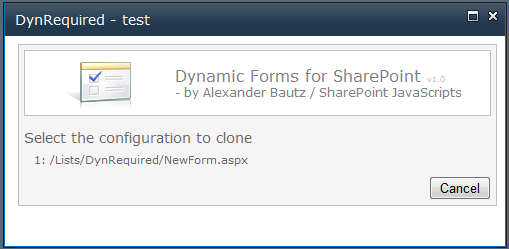
When you have configured one form – like NewForm – you can clone the setup to another form in the same list. If you enter setup for EditForm, and you have already configured NewForm, you get this prompt:
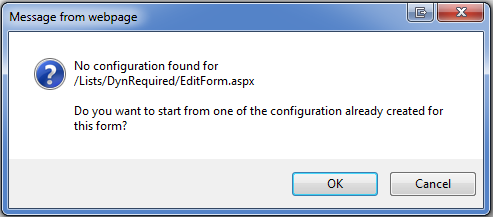
If you press OK, you are presented with a list of already configured forms in the current list:
You can have multiple values triggering the same rule. Add the values separated with the pipe character like this:
To configure a rule for a field of type “SPFieldBoolean” (Yes/No checkbox), you must enter a different value in NewForn / EditForm than in DispForm.
In NewForm and EditForm use true for checked and false for unchecked.
In DispForm use whatever text value representing “Yes” and “No”.
You can apply a rule based on the user NOT being member in a specific group or groups (separate multiple ID’s with the pipe character):
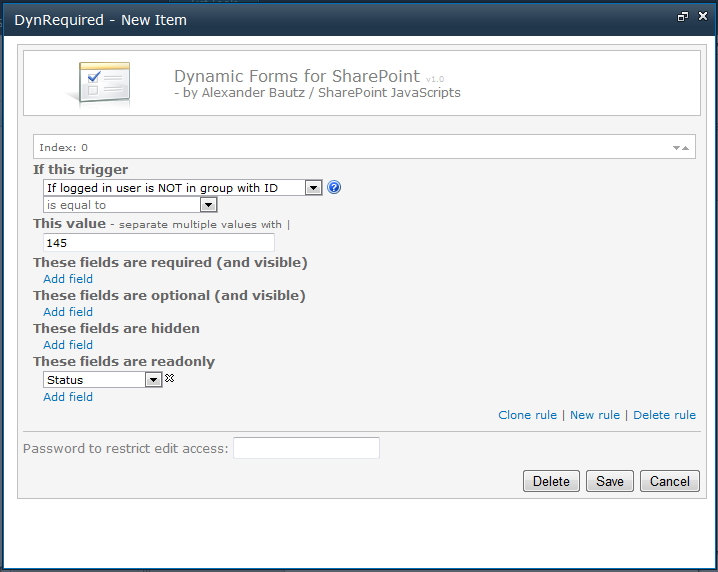
Note that the operator dropdown is disabled.
To find the group ID, go to Site Actions > Site Settings > People and groups and click on the group name.
Look at the URL to find the group ID:
http://www.contoso.com/_layouts/people.aspx?MembershipGroupId=145
If you are updating from v0.9.1 or v0.9.2 I’m fairly sure all you have to do is to enter the configuration for your form, and save it again. I might be wrong, so post any bugs below.
Post any bugs or feature requests below.
Alexander
Hi Alexander, did anything in your code change that would make this compatible with your Tabs for Sharepoint Forms solution? Thanks so much for all you do!
Hi,
I’ll try to add compatibility in future releases, but this one in no different then the BETA version.
Alexander
Hi Alexander,
Love your solutions, they are fantastic! Anyway, I just started implementing your beta, v0.9.2 and it was working, but was having issues and could only use “is equal to”, also it would give me a null error if I used more than 3 rules. I switched to your version you posted on the 29th but now it does not give me the ability to set required fields, read only… Am I doing something wrong?
Thank you,
Scott
Hi,
You can not set an EMPTY required field as read only as the field has to have a value for the user to be able to save the item.
This is only true if the field is set as required in the list settings. If you use this tool to set it as required, the required-flag is removed when the field is set as readonly.
Alexander
Hi Alexander,
Sorry, I don’t think I explained it correctly, and I know you are very busy. I have a screen shot I can send. But what is happing now for example in new item I only see these fields are hidden, there is no option for Theses fields are required, these fields are optional… And no matter what I put into the “These Fields are hidden” they still show? I do apologize, but not sure why the older version worked but not this one. I am using the current files as specified?
Thnk you,
Scott
Send me the screenshots and I’ll take a look. Alexander
Fixed in v1.1.
Alexander
Hi Alexander, Just thought I’d share since you asked for feedback. My scenario involves v1.1 and a dropdown list box. I’ve configured three respective Eq rules that hide fields. Since moving to v1.1, I’ve experienced consistent unwanted behavior. At first view of the newform page, rule 0 works. Once I start clicking dropdownlist items, rule 0 no longer works, rule 1 doesn’t and rule 2 does. Of the three rules, whatever configuration is in index 2 works while the others do not. Since rolling back to v0.9.2 its been smooth sailing.
Piasdias
Thank you for the feedback.
Obviously too little testing and a few trailing errors from other changes.
I’ll fix it and publish it later tonight.
Alexander
Hi,
Could you try with v1.2?
Alexander
Hey,
v1.2 did not fix the problem I have been experiencing. My test case is very basic. Three One DropdownListbox Eq rules that manipulate one field by either setting it hidden, read-only or required. Jumping between v0.9.2 and v1.2, the same array of rules yield difference renderings. My observation remains that rule index 2 renders as expected, while index 0 and 1 do not.
I do hope my feedback is helping because it’s really all I can do to help other than buy you beers… I just want to gain access to my pay-pal account before that can happen, and it will. Cheers!
Mark
Could you send me a screenshot of your configuration and your form? – my email is in the top of the file “DynamicFormsForSharePoint.js”
When you tried with v1.2 – did you open and SAVE the configuration when you tested? – there are some minor changes in the configuration “blob” that is stored between v0.9.x and 1.x
I really appreciate your testing of this solution as I would like it to get it right.
Regards,
Alexander
Hi,
I have published v1.2.1 and hope the bugs are fixed. The
bug occurred when an identical rule was applied for multiple options in a single choice field (select or radio). This made the rules cancel eachother out.
I have made a fix that will prevent this error, but remember that the solution is designed to take multiple values in the “This value” field when the rule for the values should be identical.
Please let me know if you still experience problems.
Alexander
Hey,
The issue seems to have been resolved. Thank you, and cheers!
Mark
I can’t seem to get this to work when using a custom Edit form in SP 2007. Am I doing something wrong? I added a new SharePoint customer form within SPD, and then hid the old edit form. Now I’m adding in the CEWP, and it shows up, the status bar shows “Please wait while scripts are loaded…” but nothing ever happens. I’ve also tried manually appending dfsetup=1 after the base URL, and nothing.
Any thoughts?
Sorry, but this solution is designed for an unmodified form. Alexander
You can make a copy of edit form with a different name and then add CEWP and reference the javascript files. It will then work.
I’m trying to set up the dynamic forms for SharePoint and I believe I have the setup configured correctly, but I continue to get the same error regardless of any changes I make troubleshooting. Specifically, I get an error:
Message: ‘id’ is undefined
Line: 1041
Char: 2
Code: 0
URI: http://xxx.xxx.xxx/Resources_jQuery/DynamicFormsForSharePoint.js
Is that error indicative of anything specific I could check?
I managed to introduce a bug in v1.2.2 that causes this error.
I’ll fix it and try to post an update as soon as possible.
Alexander
v1.2.3 should fix the problems – sorry for the inconvenience.
Alexander
That worked perfectly. Thanks!
Hi,
When I try it, I can get the GUI fine enough. I just find that I can only see ‘If this Trigger’ which shows the value If Logged in User is Not in Group with ID…”
It seems as though the tool is not pulling back any of my forms fields? Is this something you’ve seen before? Any solutions?
Thanks
Have you put the CEWP below the form web part and are you using a standard SharePoint form (not customized in SPD)?
Alexander
Thanks – did need to put them below the List. Now I get the following web page error which when I click on it means I’m unable to save. Any ideas?
Webpage error details
User Agent: Mozilla/4.0 (compatible; MSIE 8.0; Windows NT 5.1; Trident/4.0; chromeframe/19.0.1084.52; .NET CLR 1.1.4322; .NET CLR 2.0.50727; .NET CLR 3.0.4506.2152; .NET CLR 3.5.30729; .NET4.0C; .NET4.0E; InfoPath.2)
Timestamp: Fri, 8 Jun 2012 08:02:28 UTC
Message: Object expected
Line: 738
Char: 3
Code: 0
URI: site0402/RROCTracker/Shared%20DB%20Documents/DynamicFormsForSharePoint.js
Ensure you have the correct version (latest) of spjs-utility.js, and that all script paths are correct – and ensure you have the latest version of ” DynamicFormsForSharePoint.js “.
Alexander
Hi Alexander,
Yep, all the latest files referenced correctly and below the form web parts.
Got absolutely no idea why I can’t click Save….it just says Error on the Page in Internet Explorer
This is now conflicting with SPServices from Marc Anderson.
You need to be more specific regardind what conflicts you are experiencing. Alexander
Edited DynamicFormsForSharePoint.js and changed only the function and the call inside function verifyGroupMembership (2 changes only):
from:
getGroupCollectionFromUser
to:
getGroupCollectionFromUser_v2
You have a function “getGroupCollectionFromUser” in your script and so does Marc’s spservices which causes conflict with each other. Above I suggested the change to avoid this conflict…
Sorry, I forgot to answer your comment.
I have added this change to the new version I’m working on, but forgot to update the one published here – see v1.26 for the change.
Alexander
Hi Alexander,
Always appreciated your excellent work!. I upgraded to the latest version of Dynamic Forms (v.1.2.3), but it seems that boleeans (Yes/No field) are not working anymore. I set the value ‘is equal to’ ‘true’ in NewForm, but nothing is happening when the box is checked. I tried with required and hidden fields, but nothing is changing. Am I doing something wrong?
Thanks again!
Hi,
I’ll look into this later tonight – stay tuned.
Alexander
I have obviously missed this bug in several updates – it should be fixed in v1.24. Could you test it and report back?
Alexander
On second thought – I might need to tweak it a bit more to support DispForm.I’ll post back later tonight.My mistake – it works.
Alexander
It seems to be working now! Great work and thank you for the quick solution!
When i have a choice field that do not have a choice preset – what do i need to fill in as a rule? Ive tried Null, null and space, but the rule dont seem to apply 🙁
Oh dear ive feel silly now – leaving the “This value” blank works perfectly 🙂
Hmm i doesnt seem to work leaving the “This field” field blank for choice where one can choose multiple answers :-/
Any ideas as to what to use instead?
This issue should be fixed in v1.25.
Alexander
I can’t seem to thank you enough – I will test I tomorrow and report back 😉
It works like a charm – thank you for your extremly fast support 🙂
Alexander,
Love th escript, everything is working great! I do have a question, can you use the Dynamic Forms on two different lists that are not associated with each other within the same site?
Yes, You can use it in an unlimited number of forms. The configuration is identified by the unique URL of each form.
Alexander
Hey Alex,
Great update! I’m trying to use the “If user is NOT part of this group” function and it seems to be conflicting with the accordion display. (The accordion display and the dynamic forms webpart work flawlessly otherwise) The read only fields are displaying correctly how ever the hidden fields are showing unless i go into edit mode and then exit edit mode.
it doesnt seem to matter which webpart is ontop either.
Hi,
The accordion and the tabs solution will not play nicely with this solution as both show and hide fields.
I am however working on a version which combines the tabs (and maybe the accordion) functionality with the dynamic forms solution.
It will be about a week until the BETA of v2.0 is released.
Alexander
Ok. I’ll keep a look out though its strange that the hide function only messes up with that function. I dont have any other problems hiding fields with that combo.
Hi,
Its not that the hiding of the fields does not work, but that the two solutions addresses the same fields and interfere with each other. Let’s say your accordion “button” specifies that the “Status” field should be hidden, and at the same time you have a rule that says “if the Title field is empty, set the Status field as mandatory and visible”.
If the Title field is indeed empty — which solution wins?
Alexander
Hey Alex,
I was mistaken it didnt work in the other scenarios either. You make total sense.
Any update as to the status of the combined tab/dynamic form solution?
Hi,
I didn’t get time to finish it last week, but i hope to be able to release a beta version during this week.
Alexander
Ok awesome! i’ll be more than happy to test that out.
Hi Alexander,
I have several fields that are not being picked up as an available trigger. Does this not support “Lookup” type fields?
Thanks in advance!
Sorry, but Lookup columns are not supported as triggers.
Alexander
Love this add-on. However, I need a solution that would allow for a compound If statement or one that could possibly use a calculated column. I actually have two fields I need to check before deciding which formt to present. One of them is a status field which would have all fields as not required if in draft mode and the other field would determine which questions would be displayed regardless of status. I thought I could figure this out using a Calculated column but apparently this does not work with Calculatredc olumns. Is there anyway to add that to the Dynamic Forms?
Hi,
Sorry for the late reply. Calculated columns are not available in NewForm / EditForm.
I could allow for calculated columns in DispForm rules, but this might not help?
Alexander
I love your scripts… Does this work on sharepoint surveys?
Not at the moment.
Alexander
I’ve gone through all the instructions but when I try to hid a field after I have selected ‘add field’ it is blank….no values, or questions to restrict…not sure what to do
Hi,
Have you put the the CEWP below the form web part?
Alexander
Perfect, thanks a bunch….
Seems this fails with IE8 – I had put in the solution some months ago and everything was working fine, but as soon as my company switched to IE8 it started giving “error on page” and would dump the value in any People Picker fields.
I couldn’t even edit the page in SP! I had to go into SPD and remove the EditForm CEWP that way in order to get around the Error on Page bit so people could save.
Any idea what might be causing this?
Hi,
I would need some screenshots of the “error on page” details – double click the exclamation mark to see the details.
You find my email here
I”ll be away for a few days now, but will try to look into it when I come back.
Alexander
Alex,
Looking forward to the update! Can you manipulate the OK button of a form like you do columns? Yesterday, someone asked if I could hide/disable the OK button based on a rule… can that be incorporated into DF?
Mark
Yes, see v2.0. Follow the link in the top of the article.
Alexander
Alex,
Everythings set-up correctly; user are restricted from viewing the specified fields. When the user first enters the list template they do not see the restricted fields. But after they hit ‘save’ they the fields become unrestricted and are not hidden. How do I keep the fields hidden after the list template is saved.
Hi,
Not sure I understand. Is it a validation error that unhides the field before the form is saved? Or do you save the list as a template?
Alexander
Hello Alexander. Is there a way to use this scpipt in custom forms?
If i add it , the fields are not visible after i start the script
With nomal forms it works.
Patrick
Hi, This solution cannot be used in a custom form without custom made modifications for each custom form. Alexander
I love this solution, but for some reason when I use the solution on a list with multiple content types, it shows a Content Type drop down on the EditForm when I have set all other fields to read only. I don’t want this to show up, yet there is not an option to hide it. Please help!
I’ll see what I can do about the content type support in the next release. Alexander
Hi Alex,
Sorry for all the emails, any way you can do this and incoporate a pre-fill of fields (hidden or visible)? This unfortunately conflicts with SPUtility that allows me to pre-populate a field.
Hi,
See v2.0. Follow the link in the top of the article.
Alexander
Great script! Not sure if anyone else is having this problem but when a column is set to read only the description of that column is not visible. Thank you for your great work!
I have added the description to the read only fields in v2.0. Follow the link in the top of the article.
Alexander
Where may I see a demo or actual implementation??
Thank you, Tom
Hi Alexander,
I downloaded your script and used it on my site. Looks great, but somehow I cannot create conditions because in trigger I cannot see the columns from my list.
How can I add the columns from my list to the trigger?
Try putting the cewp below the list form. Alexander
Thank you! That worked! You are brilliant!
Can we use two different content types in the same list and use this solution for each content type? The content types would be child of OOB List Item content type, just with different columns.
I was wondering if the tab solution will work with external list.
Hi Alexander,
A great framework you have developed!
I have an idea/question:
Normally you have the same setup on DispForm, EditForm and NewForm, especially for tabs. It would be great if you could connect one and the same configuration to all 3 types of forms. So you don’t have to make the same changes to all 3 of them.
For example by making it possible to specify the Title in the configuration list as just /Lists//, i.e. without specifying the last part which is the name of the form page. And such a configuration should match all form pages that start with that URL.
What do you think about this idea?
Regards
Mstesson
A piece of my text was not posted correctly. This is what it should be:
…specify the Title in the configuration list as just /Lists/List Name/, i.e. without….
Regards
Mstesson
Hello Alexander. Me like this solution.
I want use your script, but i get message “You must specify a value for this required field.”. This message appear when in required field exist Russian symbols. I attempted use different version “DynamicFormsForSharePoint.js”, “jQuery” and “spjs-utility.js”.
My site work at WSS 3.0 SP3 + language pack (Rus).
If its problem solve easily, please help me. 🙂
so this has been incredible for me. One thing I can not seem to do is make it work on the edit form of a library. Is this a limitation?
I can see and access the dynamicforms but when i tryto save anything at all like a tab i created i get “the operation failed because an unexpected eror occured. (result code: 0x80070005) I have full control permissions over the ibrary that the JQ library sits and the site list. Any ideas?
Hi,
There is no limitation, it should work in a document library.
The error code you refer indicates access denied.
Alexander
Thanks. I added myself as the SCA and it all worked great. thank you for your quick reply!
For the Membership group… we have Windows security groups that are embedded within the SharePoint security group. People in those embedded groups are not being included in the Logged in user is NOT is group ID. Any ideas?
Hi,
Sorry, but I have no solution to that issue. As far as I know all users must be direct member of a SharePoint group to use this feature.
Alexander
I am implemented the above code, but its no showing me bottom left corner link. So entered dfsetup-1 at the end of the url, now form comes. But when I tried to field, its showing me blank dropdown, there is no any field in that drop down.
Are you sure you have the latest version? – this article is old. You find the latest article in this series here: https://spjsblog.com/2013/08/12/dynamic-forms-for-sharepoint-v3/
Alexander
Hi Alex,
I tried to use the DynamicForms. I am using SharePoint 2010 and I created a CEWP as below and insert it in the content editor. Nothing is showed up and below is the CEWP link:
/sites2/spqkmwhp/SiteAssets/jQuery/CEWP.DynamicForms.js.apx
When I click the “Test Link” under the URL, it shows:
Webpage error details
User Agent: Mozilla/4.0 (compatible; MSIE 8.0; Windows NT 6.1; WOW64; Trident/4.0; SLCC2; .NET CLR 2.0.50727; .NET CLR 3.5.30729; .NET CLR 3.0.30729; InfoPath.2; MS-RTC LM 8; .NET4.0C; .NET4.0E)
Timestamp: Wed, 18 Sep 2013 03:57:06 UTC
Message: Object expected
Line: 26
Char: 1
Code: 0
URI: http://sp001.xxxxxxxx.net/sites2/spqkmwhp/SiteAssets/jQuery/DynamicFormsForSharePoint_v3.js
File Content of CEWP.DynamicForms.js.aspx
The version of spjs-utility.js is V1.172
The version of DynamicFormsForSharePoint_v3.js is V3.13
Please advise how to fix it. thanks
Sorry for the late reply – still having trouble?
Alexander
It’s remarkable to pay a quick visit this web site and reading the views of all mates
concerning this article, while I am also eager of getting know-how.
Hi Alexander
This is amazing. Very excited to try it out.
In the NewForm.aspx, I keep getting the JS alert notifying me to use the latest version, even though I have downloaded from ry Listing of //SharePoint JavaScripts/spjs-utility/v1.182/.
The version in the js file is – version:1.182,versionDate:”April 21, 2014″.
The version of the ddfs is v3.310.
Any suggeston?
Much appreciated
Hon-Cheong Chan
Hi,
Could it be that you have loaded spjs-utility.js another place in the page?
Your version of DFFS is also a bit old – not sure if this has anything to do with it though.
Alexander
Hello,
Can the dynamic forms be saved within the list template? In other words I am creating a list to beta, once completed, I want to pick it up and move it but I don’t want to recreate all of the rules. I appreciate the feedback.
Hi,
This is not possible, but if you save the site as a template it can be included.
Alexander