Change log
October 1, 2014
Updated the code example to support newer versions of jQuery.
Updated the code example to support newer versions of jQuery.
Hi Alexander:
Further to your Multiple Choice Checkbox solution, do you know of a way to add a “Select All” to all checkboxes on an entire form?Thanks-
Charlie Epes
Here is a possible solution
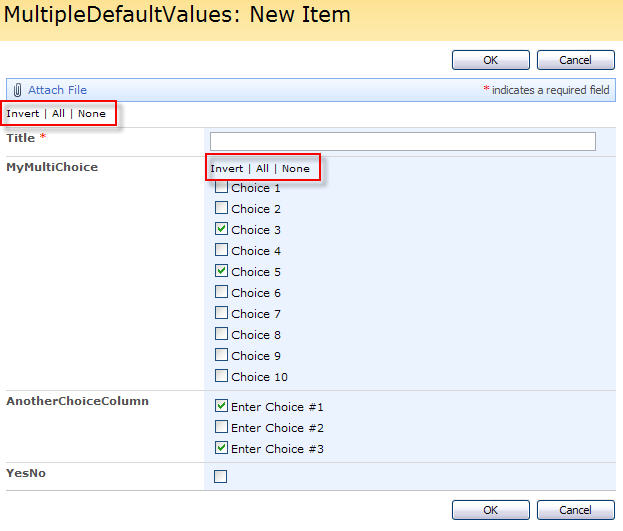
Add this code to a CEWP below the form in NewForm or EditForm: Alter the reference to jQuery if necessary.
<script type="text/javascript" src="/Scripts/jquery-1.10.2.min.js"></script>
<script type="text/javascript">
/* Add "Invert", "Check all" and "Uncheck all" to a multichoice checkbox column, or a Yes/No column
 * Created by Alexander Bautz
 * alexander.bautz@gmail.com
 * https://spjsblog.com
 * v1.1
 * LastMod: 01.10.2014
 *
*/
// Initialt all fields
var fields = init_fields_v2();

// To insert a control above a specific field call with the fieldinternalname as argument
init_toggleAll('MyMultiChoice');
// To insert a control above the formtable and control all checkboxes in the form, call with no argument
init_toggleAll();

function init_toggleAll(FieldInternalNameOrEmpty){
	var str = [], elm;
	str.push("<span title='Invert selection' style='cursor:pointer' onclick='javascript:toggleAll($(this),0)'>Invert</span> | ");
	str.push("<span title='Check all' style='cursor:pointer' onclick='javascript:toggleAll($(this),1)'>All</span> | ");
	str.push("<span title='Uncheck all' style='cursor:pointer' onclick='javascript:toggleAll($(this),2)'>None</span>");
	if(fields[FieldInternalNameOrEmpty]===undefined){
		elm = $("table.ms-formtable");
		elm.before("<div style='font-size:10px;padding-top:5px'>"+str.join("")+"</div>");
	}else{
		elm = $(fields[FieldInternalNameOrEmpty]).find('.ms-formbody');
		elm.prepend("<div style='font-size:10px'>"+str.join("")+"</div>");
	}
}

function toggleAll(elm,action){
	elm.parents("td:first").find('input:checkbox').each(function(){
		if(action === 0){
			if($(this).prop('checked')==false){
				$(this).prop('checked',true);
			}else{
				$(this).prop('checked',false);
			}
		}else if(action === 1){
			$(this).prop('checked',true);
		}else if(action === 2){
			$(this).prop('checked',false);
		}
	});
}

function init_fields_v2(){
	var res = {};
	$("td.ms-formbody").each(function(){
	var myMatch = $(this).html().match(/FieldName="(.+)"\s+FieldInternalName="(.+)"\s+FieldType="(.+)"\s+/);
		if(myMatch!=null){
			// Display name
			var disp = myMatch[1];
			// FieldInternalName
			var fin = myMatch[2];
			// FieldType
			var type = myMatch[3];
			if(type=='SPFieldNote'){
				if($(this).find('script').length>0){
					type=type+"_HTML";
				}else if($(this).find("div[id$='TextField_inplacerte']").length>0){
					type=type+"_EHTML";
				}
			}
			if(type==="SPFieldLookup"){
				if($(this).find("input").length>0){
					type=type+"_Input";
				}
			}
			// HTML Calc
			if(type==='SPFieldCalculated' && $(this).text().match(/(<([^>]+)>)/ig)!==null){
				$(this).html($(this).text());
			}
			// Build object
			res[fin] = this.parentNode;
			$(res[fin]).attr('FieldDispName',disp);
			$(res[fin]).attr('FieldType',type);
		}
	});
	return res;
}
</script>
Other similar articles:
- Limit number of allowed selections in Checkboxes choice
- Multiple default values in a column of type “Checkboxes”
Regards
Alexander
You had to one up me. lol, great job!
Hi,
I wanted to make a solution that did not require a “select all” option in the field itself.
Alexander
!!!!!!! I’m happy today! Thank you –
Charlie Epes
Hey A, been a while, hope you are well. Quick qusetion, I am using this script with the wrapchoice. The “Invert | All | None” text is displaying at the bottom of the choices. I cannot get it to default to the top. When I moved it over to the label column it defaults to either above or below the field Name, but never next to it.
How can I get the text to display in the same location as the scripts defaults when using it with your wrapchoice script?
Brilliant – this is exactly what I needed.
So Alexander, got to bug you again. Is there a way to apply this functionality to Yes/No fields in a way that I have a group of them, click Select all and they are checked?
I have an intake, for simplicity reasons we can use regions and countries. If the user needs to check all the Yes/No country fields for one reagion, is there a way to make this work, and only work on the predetermined fields selected or assigned for that region?
thanks again for all you do here.
i had all three scripts related to checkboxes together as i had 98 selection values- dependent selections, wrap choice and check all 🙂 worked great!
Hi Alexander,
I was trying to get this to work for one set of checkboxes on my page. I’m not getting an error and I’m not seeing anything different on my “new page”. At first I received a javascript error and I had to change invert, check, and uncheck to single quotes. That fixed that. I’m using init_toggleAll(‘My Internal Field Name’). I have the other init_toggleAll commented out. When I debug the script with alerts it tells me that [FieldInternalNameOrEmpty]==undefined. Do you know why I don’t see the options invert, check, and uncheck on my page?
Thank you.
Harry
I have an update. I hadn’t put my content editor web part at the bottom of the page. Now the links for Invert, All, and None are there but it doesn’t look like the event handlers are firing. It might be because I had to change the text to single quotes.
Hi,
Any errors in the developer console in IE? (hit F12 > Console).
Alexander
Hi,
Which version of SharePoint are you using?
Try loading jQuery above version 1.6 and then change all
.attr('checked'to
.prop('checked'Alexander
Hello. Thanks for this. I am trying to set this up on a SharePoint 2010 list (Calendar Event to be specific). I did the same thing has Harry to get the links to show up but nothing is happening when the links are clicked. I tried changing attr to prop without luck. I am running jquery1.11.
I get the following JS error:
Expected ‘;’
…on this line:
str = “Invert | ” + “All | ” + “None”;
…at this position in the line:
str = “<span title='Invert selection' style='cursor:pointer;' onclick='javascript:toggleAll$(this),"
Am i doing something wrong??
Hi,
Some of the quotes were messed up when I moved my blog to a new server last year. I think this should be fixed now. Try copying the code again and see if this helps.
Alexander
Hi Alexander, should this work with DFFS?
Ah, Ignore me. I hadn’t commented out the init_toggleAll();
This works fine with DFFS, placed above your DFFS CEWP.
Hi Alexander,
This solution works great. Thanks!
Unfortunately, I had to color-code my form in InfoPath Designer and the solution is obliterated.
Is there anyway to make it work after an InfoPath editing?
Sorry, this will now work in InfoPath.
You might want to look at DFFS as a replacement for InfoPath. In DFFS you can add all sorts of custom js.
Alexander